CodesChart Batch File C++ Flowchart VB6 Others About Privacy Policy
Showing posts with label codes. Show all posts

Thursday, April 4, 2019

Ordering System in C++


Hello again Codescharter, it took so long since my last devlog. As you may have read on the title this mock up project is about creating an Ordering System in C++. We may go to any fast-food stores, or any convenient store as a buyer. You are surely aware seeing a list of your orders in the screen, right? This system we are about to make is a simple as other programming system here on my blog. But don't you ever consider an ordering system as to easy coz' it may become a super system. What is a super system? Software system is composed not just one, but multiple systems. 

What is the important of learning of ordering system?
Surely you must be aware of rapid growth of technology in our society. Where people are now buying their stuff on the internet, or may visit to buy books in your favorite bookstore. To long before computer came out this system actually exist, or you try to pay a visit to the local market area that are nearest from your location. You will probably hear people who are buying their stuff right from their hands.

Now lets code Ordering System in Step by Step

1. First set up a the main function

1
2
3
4
5
6
7
#include<iostream>
#include<conio.h>
using namespace std;
int main(){

return 0;
}

As you may be wonder for what can #include<iostream>  do to your program well having it declared making you to be able to use or call all c++ functionality and syntaxes.  On the lined to is a header for extra functionality that you’d like to have in your program. Remember that iostream can only be used for c++ program only, while conio.h can be used for both c++ and c. on the lined three you see using namespace std. for c++ program very useful to get rid off std:: commands. The main function where you will input your program.

2. Declaring variables

5
6
int price, quant, set1 = 95, set2 = 100, set3 = 125, set4 = 115, payment, total = 0; 
char choice, gmenu;

the int stands for integer where you are being able to store numerical numbers for specifically a decimal numbers or whole numbers, while char stands for character to stores a single letter value or alphabet. You see I declare many in integers and being separated by comma’s. do you even recognize  those integers like set1 with an equal it’s about to replace its default value from one to 95.

3. Then create the menu

Tuesday, September 26, 2017

CodesChart

Codes Chart Purpose

Is to create a basis off every programming in-spiry to help them understand the flow of every programs or system. In programming world their is a lot of systems like grading system, ordering system, ticketing system, etc... Codes chart is meant not just for programming students but also for those, who are not into programming course but they had to do simple coding task to do their works. Like for example is statistician for analyzing data to do statistical works

To be one of the stronghold of learning fundamentals and reference for student and all inspiring programmer someday. To encourage young ones to pursue their dreams and never give-up. Be passionate on things that they working, thinking that enough is not enough. Be hungry to learn lot new things. To develop everyone's programming skill and fully standards every systems from being a MVP to a Larger Project Systems. To nurture young minds in programming and developing things that they didn't know they could.

Codes Chart Facebook Page

If your having trouble to find this blog you can like my FB page, which is connected to Codes Chart their you can see every blog post separately as a normal page post each post has link to its respected blog post. Then never be bother to get notification for new upcoming blog post in the future. The Codes Chart facebook page serve as a bookmark of every post. Also if you'll like I also accepting donation to get a custom domain for better user experience for the blog I accept both cash and bitcoin my wallet Addresses in the bottom. 

Tuesday, February 14, 2017

Ordering System with Simple Database

Ordering system with simple database is a good practice as where most beginners will try to find the most easiest system that will not take a lot of time in development. One of the simplest form of database system is ordering where the user acts as a cashier. Also as we think about ordering system or cashiering system, what will think is about fast foods computerize applications which setting your order to their databases. Cashiering and ordering system is very alike but that is not the topic, what I gonna tell here is the knowledge to make an ordering system for those who don't have yet any kind of idea of how it works. 

Ordering System
Sample Ordering System with names and captions (Form1)
What you see in above image is Form1 of my ordering system I made it simple and easy to understand. As you may see I used tabs with different buttons inside and each buttons has a command where every time it was press it triggers that a transaction has being started. Each buttons inside the tab area will produce product names in the listbox it name as List1 as you may see on above image. Everytime you press each buttons inside a tab area it also show a product value or price in the textbox name as txtPrice as you may see on above image. You may also track the total value or price of all item sellected or pressed in the textbox name as txttotal as you may see in above image. I made this ordering system or cashiering seemingly alike to those we can see in most fast foods chain giants that we almost went a lot.

As most ordering system I added an area where you can place the customers money on hand or the money that his going to give you as a payment. You will also find a textbox where you can see the total change that you'll give back to the customer as if he pay you more than enough. Also a textbox that will show the date today you need as much information to be stored in the database so you're not going to lose track of your earnings. Because the main process of every ordering systems or cashiering systems is about calculating each amount of money of our costumer and make a difference with all the products he choose to buy.

Tuesday, January 24, 2017

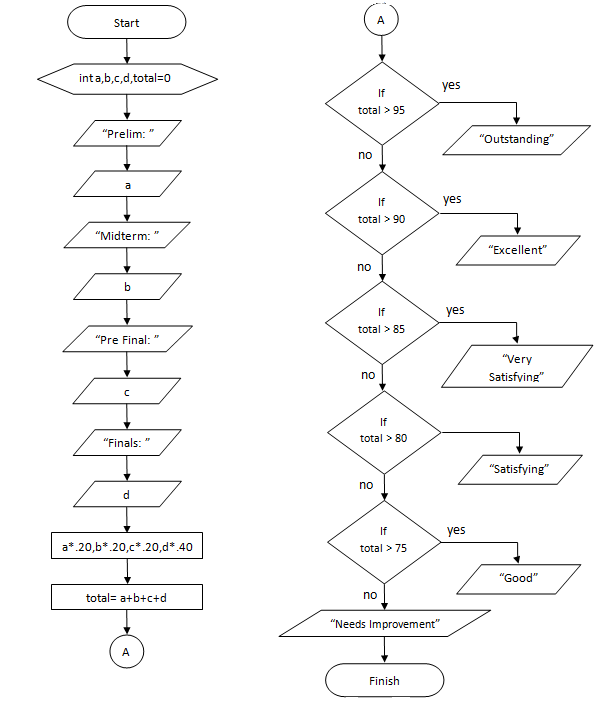
Basic Flowchart of Grading System

Hello! everyone I'm new here on blog and like to share some knowledge about making your own flowchart with codes. Other's think learning flowchart is not needed as long as you are skilled in programming but its wrong. before you code you must start with a plan a blueprint before doing some work; or else your doing a lot of trials and errors. Therefore I came up of an idea of sharing my knowledge on developing flowchart using this blog as a instrument. Studying flowchart is not really hard as long as you memorize the uses of every shape below and when they use.

Grading System Flowchart

Grading System Flowchart


Grading system source code (C++).

For Those Using Mobile Phone Please Check if your browser request for Desktop site (WEB) or WWW so you can view the entire codes, or Highlight all codes and copy in your mobile text editor). like what you see in the image below just simply click it.
Web View
Click "View web version"


#include<iostream>
#include<conio.h>
using namespace std;
int a,b,c,d,total=0;
main(){
cout<<"Prelim: ";